
Chevrolet Cruze Repair Manual: Rear Wheel Bearing and Hub Replacement (Drum Brake)
Special Tools
EN 45059 Torque Angle Sensor Kit
For equivalent regional tools, refer to Special Tools.
Removal Procedure
- Raise and suitably support the vehicle. Refer to Lifting and Jacking the Vehicle.
- Remove the tire and wheel assembly. Refer to Tire and Wheel Removal and Installation.
- Remove the brake drum. Refer to Brake Drum Replacement.
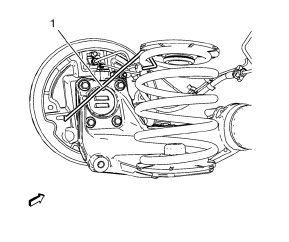
- Remove the plug from the drum brake actuator access hole in the backing plate. Using the access hole, install a heavy mechanic wire (1) in order to support the brake backing plate.
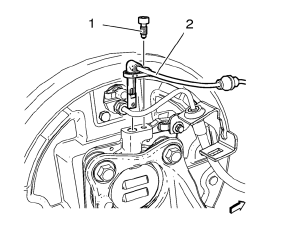
- Remove the wheel speed sensor bolt (2).
- Remove the wheel speed sensor (1).
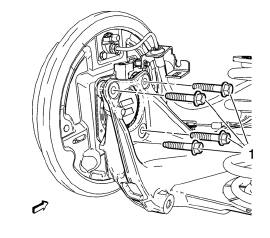
- Remove the wheel bearing/hub mounting bolts (1).
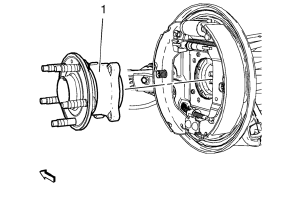
- Remove the wheel bearing/hub assembly (1) from the rear axle assembly and brake backing plate.
Installation Procedure
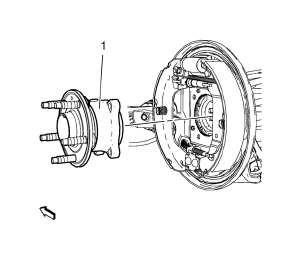
- Install the wheel bearing/hub assembly (1) to the brake backing plate and the rear axle assembly.
Caution: Refer to Fastener Caution in the Preface section.
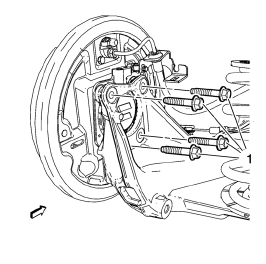
Note: Tighten the bolts evenly, in a cross-pattern.
- Install the wheel bearing/hub mounting bolts (1) and tighten to 50 N·m
(37 lb ft) + 40° , using the EN 45059 kit.
Tighten the bolts evenly, in a cross-pattern.
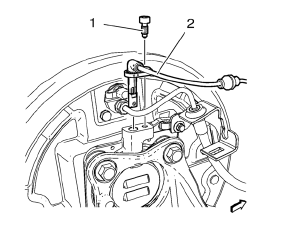
- Install the wheel speed sensor (1).
- Install the wheel speed sensor bolt (2) and tighten to 6 N·m (54 lb in).
- Remove the support (1) from the brake backing plate.
- Install the plug to the drum brake actuator access hole in the backing plate.
- Install the brake drum. Refer to Brake Drum Replacement.
- Install the tire and wheel assembly. Refer to Tire and Wheel Removal and Installation.
- Remove the support and lower the vehicle.
 Rear Wheel Bearing and Hub Replacement (Disc Brake)
Special Tools
EN 45059 Torque Angle Sensor Kit
For equivalent regional tools, refer to Special Tools.
Removal Procedure
Raise and suitably support the vehicle. Refer to Lifting and ...
 Rear Axle Bushing Replacement
Special Tools
CH 6616 Hydraulic Hand Pump
CH 6615-10 Hydraulic Cylinder
CH-48377-1 Chisel
CH-49233 Adapter
CH 906-42 Adapter
For equivalent regional tools. Refer to Special Tools
Remov ...
Other materials:
Front Side Door Replacement
Preliminary Procedure
Remove the front side door trim panel. Refer to Front Side Door Trim
Replacement.
Front Side Door Check Link Bolt
Caution: Refer to Fastener Caution in the Preface section.
Procedure
Remove the water deflector.
Disconnect the door electrical connector.
Su ...
Removal Procedure
Warning: Refer to Approved Equipment for Collision Repair Warning in the
Preface section.
Warning: Refer to Glass and Sheet Metal Handling Warning in the Preface section.
Disable the SIR System. Refer to SIR
Disabling and Enabling.
Disconnect the negative battery cable. Refer to ...
Installation Procedure
Drill 8 mm (5/16 in) for plug welding along the edges of the rear inner
wheelhouse as noted from the original panel.
Note: If the location of the original plug weld holes can not be
determined, space the plug weld holes every 40 mm (1½ in).
Clean and prepare the attaching & ...
