
Chevrolet Cruze Repair Manual: Removal Procedure
Warning: Refer to Approved Equipment for Collision Repair Warning in the Preface section.
Warning: Refer to Glass and Sheet Metal Handling Warning in the Preface section.
- Disable the SIR System. Refer to SIR Disabling and Enabling.
- Disconnect the negative battery cable. Refer to Battery Negative Cable Disconnection and Connection.
- Remove all related panels and components.
- Visually inspect the damage. Repair as much of the damage as possible.
- Remove the sealers and anti-corrosion materials from the repair area, as necessary. Refer to Anti-Corrosion Treatment and Repair.
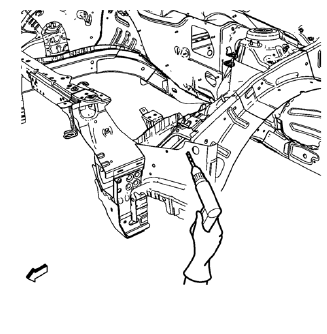
- Locate and mark all the necessary factory welds of the front wheelhouse panel rear reinforcement.
- Drill all factory welds. Note the number and location of welds for installation of the service assembly.
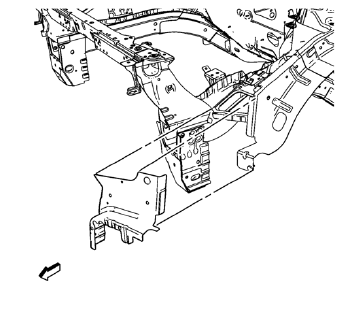
- Remove the front wheelhouse panel rear reinforcement.
 Front Wheelhouse Panel Rear Reinforcement Replacement (MAG-Welding)
Note: According to different corrosion warranties, only the
regional mandatory joining methods are allowed. ...
 Installation Procedure
Drill 8 mm (5/16 in) for plug welding along the edges of the front
wheelhouse panel rear reinforcement as noted from the original
panel.
Drill 8 mm (5/16 in) for plug welding whe ...
Other materials:
Adding Equipment to the Airbag-Equipped Vehicle
Adding accessories that change the vehicle's frame, bumper system, height, front
end, or side sheet metal, may keep the airbag system from working properly. The
operation of the airbag system can also be affected by changing or moving any parts
of the front seats, safety belts, the airbag ...
How To Indentify Plastic Parts
Plastic parts can be identified by the SAE code, which is usually found on
the rear of the part, and/or by the characteristics of the plastic.
Knowing the type of plastic aids in selecting the proper repair materials and in
selecting the proper repair procedure.
Look for the SAE code s ...
Driver or Passenger Seat Replacement
Removal Procedure
Warning: Refer to SIR Warning in the Preface section.
Warning: When carrying a live inflator module, make sure the bag
opening is pointed away from you. This minimizes the chance of
injury in the case of an accidental deployment. Never carry the inflator module
by the wi ...
