
Chevrolet Cruze Repair Manual: Windshield Washer Pump Seal Replacement
Removal Procedure
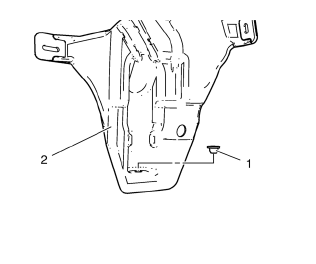
- Open the hood.
- Remove the windshield washer pump. Refer to Windshield Washer Pump Replacement
- Using a small flat-bladed tool, remove the washer pump terminal seal (1) from the washer solvent container (2).
Installation Procedure
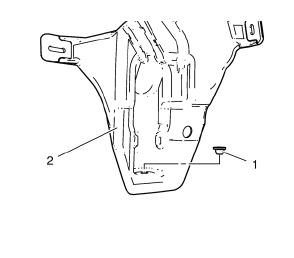
- Position the washer pump terminal seal (1) to the washer solvent container (2), pressing in until fully seated.
- Install the windshield washer pump. Refer to Windshield Washer Pump Replacement
- Close the hood.
Air Inlet Grille Panel Replacement
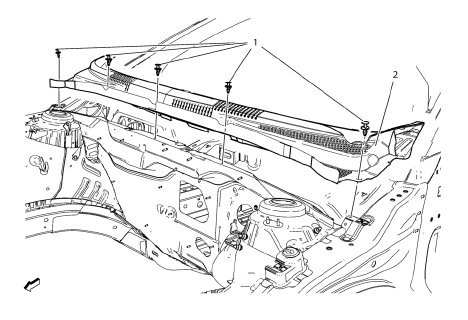
Preliminary Procedure
Remove the wiper arms. Refer to Windshield Wiper Arm Replacement.
- Air Inlet Grille Panel Clip (Qty: 5)
- Air Inlet Grille Panel Assembly
Procedure
Remove hood rear weatherstrip.
 Windshield Washer Pump Replacement
Removal Procedure
Remove the front wheelhouse liner. Refer to Front Wheelhouse Liner
Replacement.
Disconnect the washer pump electrical connector (1).
Disconnect the washer pump hose (2 ...
 Windshield Wiper Arm Replacement
Windshield Washer Arm Finish Cap
Tip
Use a small flat-bladed tool to remove finish cap.
Special Tools
BO-6626 Wiper Arm Puller
For equivalent regional tools, refer to Special Tools.
...
Other materials:
Installation Procedure
Align the rear compartment floor panel.
Drill 4 mm (3/16 in) for rivets along the edges of the rear compartment
floor were you cant apply a resistance spot welder.
Clean and prepare the attaching surfaces for
spot welding and riveting.
Apply structural adhesive to all a ...
Exit Lighting
The headlamps, taillamps, parking lamps, back-up lamps, and license plate lamps
come on at night, or in areas with limited lighting, when the key is removed from
the ignition.
The dome lamps also come on when the key is removed from the ignition. The exterior
lights and dome lamps remain on a ...
Using the Navigation System
Use the NAV button on the faceplate or Home Page to access the navigation map.
Press the NAV button again to change between alternative views of the normal
split and full map views.
The Menu screen button at the bottom right side of the display accesses the Navigation
Menu.
The touch-sens ...
