
Chevrolet Cruze Repair Manual: Installation Procedure
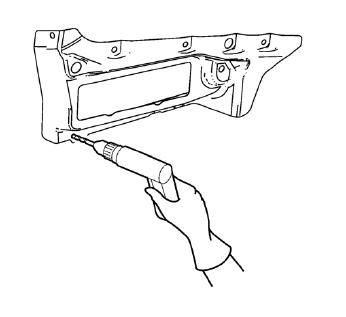
- Drill 8 mm (5/16 in) for plug welding along the edges of the body side outer lower panel as noted from the original panel.
Note: If the location of the original plug weld holes can not be determined, space the plug weld holes every 40 mm (1½ in).
- Clean and prepare the attaching surfaces for welding.
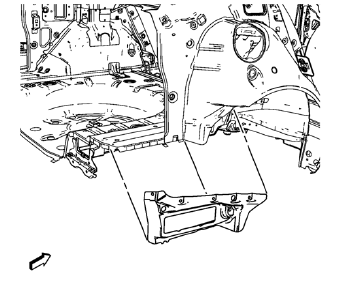
- Position the body side outer lower panel on the vehicle.
- Verify the fit of the body side outer lower panel.
- Clamp the body side outer lower panel into position.
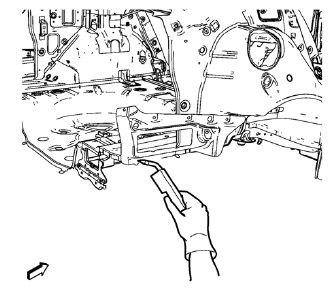
- Plug weld accordingly.
- Apply the sealers and anti-corrosion materials to the repair area, as necessary. Refer to Anti-Corrosion Treatment and Repair.
- Paint the repaired area. Refer to Basecoat/Clearcoat Paint Systems.
- Install all related panels and components.
- Connect the negative battery cable. Refer to Battery Negative Cable Disconnection and Connection.
- Enable the SIR system. Refer to SIR Disabling and Enabling.
 Removal Procedure
Warning: Refer to Approved Equipment for Collision Repair Warning in the
Preface section.
Warning: Refer to Glass and Sheet Metal Handling Warning in the Preface section.
Disable the SIR Syst ...
 Body Side Outer Lower Panel Replacement (MIG-Brazing)
Note: According to different corrosion warranties, only the
regional mandatory joining methods are allowed. ...
Other materials:
Windshield Wiper/Washer
The windshield wiper/washer lever is on the right side of the steering column.
With the ignition in ACC/ ACCESSORY or ON/RUN, move the windshield wiper lever to
select the wiper speed.
HI: Use for fast wipes.
LO: Use for slow wipes.
INT: Move the lever up to INT for intermittent wipes, th ...
Installation Procedure
Drill 8 mm (5/16 in) for plug welding along the edges of the front
compartment upper side rail as noted from the original panel.
Clean and prepare the attaching surfaces for welding.
Position the front compartment upper side rail on the vehicle.
Verify the fit of the fr ...
Low-Profile Tires
If the vehicle has P225/45R18 size tires, they are classified as low‐profile
tires. These tires are designed for very responsive driving on wet or dry pavement,
however, may produce more road noise and tend to wear faster.
Notice: Low-profile tires are more susceptible to damage from road ...
