
Chevrolet Cruze Repair Manual: Installation Procedure
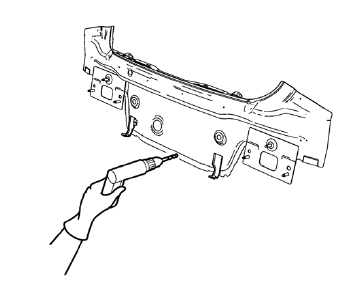
Note: If the location of the original plug weld holes can not be determined, space the plug weld holes every 40 mm (1½ in).
- Drill 8 mm (5/16 in) for plug welding along the edges of the body rear end panel as noted from the original panel.
- Clean and prepare the attaching surfaces for welding.
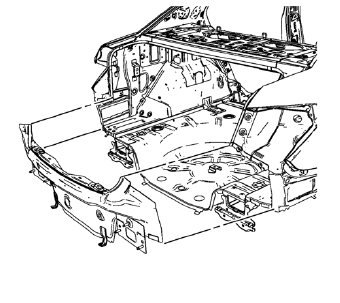
- Position the body rear end panel on the vehicle.
- Verify the fit of the body rear end panel.
- Clamp the body rear end panel into position.
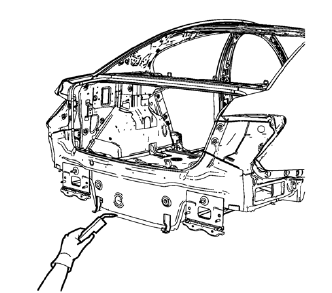
- Plug weld accordingly.
- Apply the sealers and anti-corrosion materials to the repair area, as necessary. Refer to Anti-Corrosion Treatment and Repair.
- Paint the repaired area. Refer to Basecoat/Clearcoat Paint Systems.
- Install all related panels and components.
- Connect the negative battery cable. Refer to Battery Negative Cable Disconnection and Connection.
- Enable the SIR system. Refer to SIR Disabling and Enabling.
 Removal Procedure
Warning: Refer to Approved Equipment for Collision Repair Warning in the
Preface section.
Warning: Refer to Glass and Sheet Metal Handling Warning in the Preface section.
Disable the SIR Syst ...
 Body Rear End Panel Replacement (MIG-Brazing)
Note: According to different corrosion warranties, only the
regional mandatory joining methods are allowed. ...
Other materials:
Cruise Control
For vehicles with cruise control, the vehicle can maintain a speed of about 40
km/h (25 mph) or more without keeping your foot on the accelerator. Cruise control
does not work at speeds below 40 km/h (25 mph).
If the brakes are applied, the cruise control shuts off.
The vehicle has a Traction ...
Tire Inspection
We recommend that the tires, including the spare tire, if the vehicle has one,
be inspected for signs of wear or damage at least once a month.
Replace the tire if:
• The indicators at three or more places around the tire can be seen.
• There is cord or fabric showing through the tire's rubb ...
Safety Belt Reminders
Driver Safety Belt Reminder Light
There is a driver safety belt reminder light on the instrument cluster.
When the vehicle is started, this light flashes and a chime may come on to remind
the driver to fasten their safety belt. Then the light stays on solid until the
belt is buckled.
This c ...
