
Chevrolet Cruze Repair Manual: Rear Side Door Window Adjustment
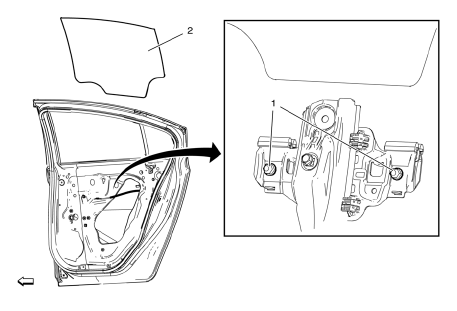
Warning: Refer to Glass and Sheet Metal Handling Warning in the Preface section.
Warning: Refer to Express Window Down Warning in the Preface section.
Preliminary Procedures
- Remove the rear side door trim. Refer to Rear Side Door Trim Replacement.
- Remove the water deflector. Refer to Rear Side Door Water Deflector Replacement.
- Rear Side Door Window Regulator Sash Nut (Qty: 2)
Caution: Refer to Fastener Caution in the Preface section.
Tighten 10 N·m (89 lb in)
- Rear Side Door Window
Procedure
- Loosen the window regulator sash nuts.
- Connect the door trim panel wire connector.
Note: Start the vehicle to ensure maximum power to the window motor. This is required in order to fully seat the window for adjustment.
- Start the vehicle.
- Using the power window switch, raise the window to the full up position.
- Tighten the rear side door window regulator sash nuts.
- Inspect for proper window operation and a tight seal.
- Shut off the vehicle.
 Front Side Door Window Replacement
Preliminary Procedure
Position the window approximately half way down in the door.
Remove the water deflector. Refer to Front Side Door Water Deflector
Replacement.
Remove t ...
 Rear Side Door Window Replacement
Preliminary Procedures
Position the window approximately half way down in the door.
Remove the water deflector. Refer to Rear Side Door Water Deflector
Replacement.
Remove the out ...
Other materials:
Exterior Lighting Systems Description and Operation
Exterior Lamps
The exterior lighting system consists of the following lamps if equipped:
Headlamps
Daytime Running Lamps (DRL)
Front fog lamps
Rear fog lamps
Park, tail and license lamps
Turn signal lamps
Hazard warning lamps
Repeater lamps
Stop lamps
Backup lamps
Low Beam ...
Securing Child Restraints (Rear Seat)
When securing a child restraint in a rear seating position, study the instructions
that came with the child restraint to make sure it is compatible with this vehicle.
If the child restraint has the LATCH system.
Do not secure a child seat in a position without a top tether anchor if a national
...
Front Side Door Window Adjustment
Warning: Refer to Glass and Sheet Metal Handling Warning in the Preface
section.
Warning: Refer to Express Window Down Warning in the Preface section.
Preliminary Procedure
Remove the front side door trim. Refer to Front Side Door Trim
Replacement.
Remove the water deflector. Refe ...
